

Architecture Overview
One API for the entire voice conversation — listening, thinking, and speaking over a single connection.
Building a voice agent usually means stitching together a speech-to-text service, an LLM, a text-to-speech service, and a pile of glue code to manage turn-taking, interruptions, and audio streaming between them. Each hop adds latency, failure modes, and conversational state you have to track yourself.
Deepgram’s Voice Agent API collapses that stack into a single, unified API. You open one WebSocket connection, send audio in, and receive audio out. Deepgram runs the full speech loop — speech-to-text, LLM orchestration, and text-to-speech — and handles the hard real-time problems (end-of-turn detection, interruption handling, function calling) natively. You spend your engineering time on what your agent does, not on how it hears or talks.
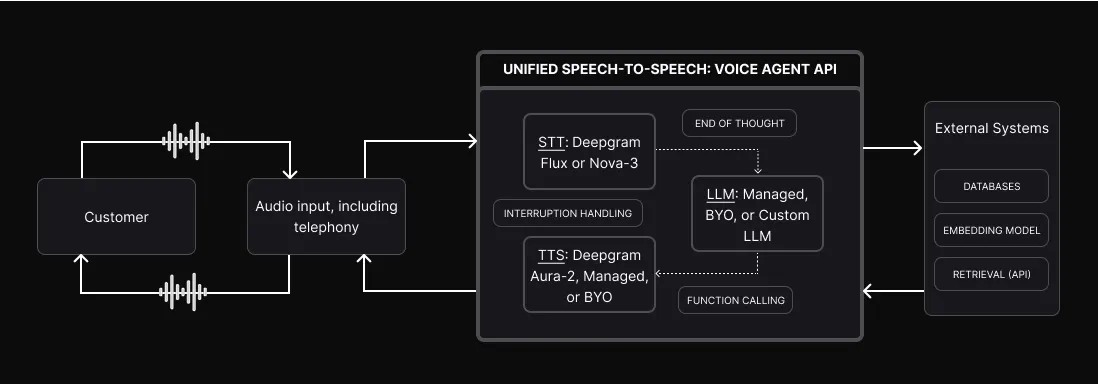
One connection, the whole loop
A voice conversation is a loop: the user speaks, the agent understands, decides what to say, and speaks back — over and over, in real time. The Voice Agent API owns that entire loop so you don’t have to coordinate it across services.
Audio streams in from any source — a browser, a mobile app, or a phone call over your telephony provider. Deepgram transcribes it, passes the text to the language model, converts the model’s reply back to speech, and streams the audio out. Because all three stages live behind one API, the handoffs happen in-process: there are no extra network round trips between transcription, reasoning, and synthesis, which is what keeps responses fast enough to feel like a real conversation.
What the API handles for you
Each stage of the loop is a component you configure, not infrastructure you build.
Beyond the three stages, the conversational hard parts are built in:
- End-of-turn detection — the agent knows when the user has actually finished a thought, not just paused, so it can respond promptly without talking over them. This comes from Flux’s turn model rather than a bolted-on voice-activity detector. See Understanding the Flux State Machine.
- Interruption handling (barge-in) — when the user starts speaking while the agent is talking, the agent stops and listens, the way a person would.
- Function calling — the LLM can call external tools and APIs in the middle of a conversation to fetch data or take action. See Function Calling.
How a single turn flows
Audio in
The customer’s audio streams into the API over one connection, from a browser, app, or phone call.
Transcribe
Speech-to-text turns the audio into text in real time and detects when the user’s turn ends.
Each of these stages maps to a concrete WebSocket message: Settings configures the pipeline, transcript events flow from STT, AgentThinking and FunctionCallRequest capture LLM decisions, and audio responses stream back as binary frames. To see the exact message sequence — from opening the connection through a full conversation loop — read the Voice Agent Message Flow.
Connecting to the outside world
The API is the conversational core, and it extends in three directions:
- External systems — within a turn, your LLM and function calls can reach embedding models, databases, and retrieval APIs to ground responses in your own data.
- Telephony — connect the agent to phone networks for inbound and outbound calls through providers like Twilio, Plivo, Genesys, Amazon Connect, and AudioCodes.
- Response injections — push messages into the conversation from your application, so server-side events can shape what the agent says.